Guide · 48 min read
SO-101 and LeRobot: Teleoperation Practice at Home (2026)
Written by Yuma Heymans, Founder & CEO of RobotTraining.jobs.
Runs RobotTraining.jobs and AITraining.jobs as founder and CEO, and co-founded HeroHunt.ai, an AI recruitment platform. San Francisco based, and for years focused on how the people who teach robots and AI systems are found, hired and paid.
How to build real teleoperation practice at home with an open-source robot arm, and what that practice does and does not prove to an employer
On October 30, 2026 we read 40 job postings for people who operate robots or record demonstrations for them, taken from the live RobotTraining.jobs board. Fifteen of them mention VR headsets, fourteen ask about game controllers or gaming, and fifteen mention robotics or teleoperation experience as a requirement, a preference or a bonus. None of them names LeRobot or the SO-101 arm, and none asks you to own robot hardware. Yet one of them, Collaborative Robotics' data collection operator role in Santa Clara, lists this as a preferred qualification: "Prior experience in robotics or engineering through school projects, personal builds, or clubs like FIRST, VEX, or Science Olympiad" - Collaborative Robotics.
That sentence captures the problem this guide is about. Robot teleoperation is the most open door into paid robot-training work: our board lists 79 open teleoperation roles and 130 demonstration collection roles today, and many of them train you from scratch. But when a lab reads fifty applications for one operator seat, the applicants who have already moved a robot, recorded an episode and watched a model learn from it are easier to say yes to. Until recently that kind of experience required access to a university lab. It no longer does. The SO-101, an open-source robot arm designed by The Robot Studio with Hugging Face, comes as a pair: a leader arm you move by hand and a follower arm that copies you, the same principle several labs on our board use. Its official parts list prices the two arms at $229.88 in the United States - The Robot Studio, and assembled pairs sold for $299 on the day we checked.
This guide is written for people who want robot teleoperation or robot data collection jobs and lack the experience postings ask for. It is built on the postings themselves, on the sellers' own product pages and on Hugging Face's documentation, all read on October 30, 2026. You will learn what the postings actually ask for, what LeRobot and the SO-101 are, how leader-follower teleoperation works, what a kit costs from which seller, whether to buy assembled or build it yourself, how to practice in a way that resembles a real shift, how to record and train on your own demonstration data, how each part of that maps onto job requirements, and where home practice stops being useful. It is honest about the limits: no posting requires a home kit, and practice shows interest and builds skill, it does not guarantee a job.
Contents
- What teleoperation and data collection postings actually ask for
- What LeRobot and the SO-101 are
- How leader-follower teleoperation works
- What a kit costs, and who sells it
- Assembled, kit or build it yourself
- Setting up: from box to first teleoperation
- Practicing teleoperation like it is a shift
- Recording demonstration datasets the way employers grade them
- Training a policy, and correcting it by hand
- How home practice maps onto job requirements
- Turning practice into evidence an employer can check
- Limits, costs and risks
- Who should buy one, and who should not
- How we researched this guide
- Frequently asked questions
At a glance: eight ways to get a leader-follower setup, scored
Before the detail, here is the whole buying decision on one table. We scored eight ways to get a working SO-101 leader-follower pair (or, in one case, a VR-driven alternative) on the four things that matter to someone buying it for job practice rather than for research: what it costs, how quickly you are teleoperating, how closely it matches the official LeRobot instructions you will follow, and whether you can actually buy it today. Every price and stock status comes from the seller's own page as read on October 30, 2026, and each one is linked in section 4.
Read the table as a map for a job seeker, not as a product review. A researcher who wants to modify the hardware would weigh things differently, and someone who already owns a 3D printer will find the build-it-yourself route far better than its score suggests. The question this table answers is narrower: if you want to be teleoperating a real arm and recording episodes as soon as possible, for the least money and the fewest surprises, which route is best?
| # | Route | What it is | Cost (30%) | Time to first teleop (25%) | Matches official docs (25%) | Buy today (20%) | Final |
|---|---|---|---|---|---|---|---|
| 1 | Seeed Studio, Pro assembled kit | Assembled SO-101 kit from the first vendor in the official kit list | 7 - $299.00 | 9 - arrives assembled; you calibrate and go | 9 - reference Feetech servos; Seeed's own LeRobot wiki | 9 - "In stock", US, German and Chinese warehouses | 8.4 |
| 2 | WowRobo, assembled pair | Assembled leader and follower plus one camera | 7 - $299 with a camera | 9 - assembled; ships in 1 to 3 business days per the page | 9 - listed in the official kit list | 8 - no stock limit shown; US duties prepaid per the page | 8.2 |
| 3 | WowRobo, unassembled kit | Printed parts, servos and a camera for both arms | 8 - $259 with a camera | 5 - you assemble both arms and set 12 motor IDs | 9 - listed in the official kit list | 8 - no stock limit shown | 7.5 |
| 4 | Waveshare, kit with printed parts | Servos, resin-printed parts and driver boards | 7 - $289.99 (US version) | 5 - you assemble both arms | 9 - Waveshare supplies the project's driver board | 8 - US, EU and UK versions on sale | 7.2 |
| 5 | Build from the official parts list | Order every part yourself and 3D print the frame | 8 - $229.88 in parts, plus printing | 2 - several orders, printing and assembly | 10 - this is the reference design | 7 - parts from Alibaba and Amazon, several orders | 6.8 |
| 6 | Hiwonder, assembled Starter Kit | Hiwonder's own version with its own bus servos | 5 - $370.99 | 9 - arrives assembled | 5 - Hiwonder HX servos and tutorials, not the reference motors | 8 - listed as available | 6.6 |
| 7 | PartaBot, assembled full kit | US seller of assembled pairs | 4 - $479 | 9 - assembled, ships from the US | 9 - listed in the official kit list | 1 - sold out on October 30 | 5.9 |
| 8 | Phospho, starter pack | Two SO-100 arms driven from a Meta Quest app | 2 - 995 euros | 8 - VR control "out of the box" per the page | 6 - older SO-100 design, Phospho's own software | 6 - price shown, stock not stated | 5.3 |
How the criteria work. Cost (30%) carries the most weight because the whole point is a cheap way to practice, and it is scored on the list price of a complete pair before shipping and import duties. Time to first teleop (25%) rewards assembled kits, because every week spent sourcing and screwing is a week not spent practicing the skill employers screen for. Matches official docs (25%) rewards hardware that runs the official Hugging Face instructions as written, since those instructions are what you will follow and what other builders can help you with. Buy today (20%) reflects what the seller's page showed on October 30: in stock, sold out or unstated.
1. What teleoperation and data collection postings actually ask for
Start with the jobs, not the hardware, because the hardware only matters if it moves you closer to a job. Teleoperation means controlling a robot directly, so that your movements become its movements, and most teleoperation jobs on our board exist to produce training data: every task you perform through the robot is recorded as an episode that a model learns from. Our teleoperation guide explains the work itself in depth, and our data collection jobs guide covers the wider family of jobs that produce robot training data. Here the question is narrower: what do the postings ask a newcomer to bring?
To answer it, we read the postings rather than summarizing them from memory. On October 30, 2026 the board's search returned 80 open teleoperation roles and 130 open demonstration collection roles. We opened 155 of those postings, kept one per employer and job title among the roles that involve operating a robot or recording demonstrations on site, and dropped driving, video-only capture and installation roles. That left 40 postings from employers including Physical Intelligence, Figure, 1X, Dyna Robotics, RoboForce, Rhoda AI, Sereact, Genesis AI, Humanoid, Dexmate, Nidus, FS Studio, TSMG and Welo Data. The chart counts how many of them mention each kind of skill or background.
Three patterns stand out. First, VR and controllers dominate. Rhoda AI's robot pilots in Munich need "Strong VR / controller proficiency (VR gaming or similar real-time control experience)" - Rhoda AI. FS Studio's teleoperators use "VR headsets, haptic gloves, dual-analog controllers, and multi-monitor setups" - FS Studio. Second, experience is usually a plus, not a gate: 12 of the 40 say outright that no prior experience is needed or that training is provided, like Nidus in New York, which writes "Previous robotics experience is helpful but not required. We provide paid training and certification on our equipment" - Nidus. Third, a meaningful minority of postings describe rigs you drive with your own arm and hand movements, which is exactly what an SO-101 leader arm is. Physical Intelligence tells operators they will "Either lead robot movements with your arms (the robot mirrors your actions) or guide robots using specialized controllers" - Physical Intelligence. RoboForce asks candidates to be "Familiar with using teleop tools like UMI style, GELLO style, VR-Based Systems, etc." - RoboForce.
Two smaller signals matter for anyone thinking about home practice. Seven postings mention the command line, Linux or Python, usually at a basic level: Sereact's teleoperation intern in Stuttgart will "Use terminal basics to run existing tooling (bash + Python scripts) for data collection, uploads, and checks", and the posting adds that "Some experience with the command line or Python is a plus, but we'll teach you what you need" - Sereact. And exactly one posting, for Sereact's Teleoperation Trainer, asks for "Familiarity with imitation learning or how demonstration data is used in robot policy training" - Sereact. That is a senior role, but it names precisely what a LeRobot project teaches.
| What postings ask | Example from a live posting | What it tells a newcomer |
|---|---|---|
| VR comfort | 1X: "Comfortable working in VR environments" | You need hours in a headset, not a degree |
| Controller skill | TSMG: "Experience with gaming controllers or simulation platforms" | Gaming counts as evidence |
| Repetitive precision | Adexis: gaming, VR, crafts, barista work "or anything that proves repetitive, fine motor skill" | Any steady-hands record helps |
| Basic technical literacy | Dyna: "the command line, bash, linux OS" | A terminal should not scare you |
| Robot exposure | Welo Data: "Prior teleoperation/robotics or lab data collection experience preferred; training provided" | Exposure is preferred, then trained |
Read together, the postings describe a job that wants dexterity and consistency, comfort with control interfaces and a little technical confidence, and that will teach the specific rig. Adexis in London says it plainly: no prior experience is required, and it values "Experience with gaming, VR, musical instruments, crafts, barista work, or anything that proves repetitive, fine motor skill" - Adexis. Why this matters: a home arm cannot give you a lab's VR rig, but it can give you the three things that sit underneath almost every posting, namely real hours controlling a robot, a record of repetitive precise work, and the command-line comfort several employers mention. How to apply it: before buying anything, read five postings you would actually apply to and write down which of these items each one names. That list, not this guide, should decide how you practice.
2. What LeRobot and the SO-101 are
LeRobot is Hugging Face's open-source software library for real-world robotics. It handles the whole chain a robot-learning project needs: talking to the motors, teleoperating, recording datasets, training models and running them on the robot. Its code is public on GitHub under the Apache-2.0 licence, where it had 28,586 stars on October 30, 2026 and its latest release was version 0.6.1, published on August 3, 2026 - GitHub. Hugging Face is best known as the place where AI models and datasets are shared, and LeRobot plugs into that: every dataset you record can be uploaded to the Hugging Face Hub, where it sits next to everyone else's.
The SO-101 is the robot arm LeRobot's documentation calls "our flagship robot" - Hugging Face. It was designed by The Robot Studio in collaboration with Hugging Face, and the repository describes it as "the next-generation version of the SO-100 robot arm" with "improved wiring" that "is easier to assemble (no gear removal) and uses updated motors for the leader arm" - The Robot Studio. The design files are free to download and print, also under Apache-2.0. When Hugging Face released the SO-101 in April 2025, TechCrunch reported that it starts at $100, with supplier prices ranging up to around $500 depending on the vendor - TechCrunch. A teleoperation setup needs two arms, and the official parts list now prices the pair at $229.88, so the realistic price for a complete setup today is $230 to $300.
Each arm has six motors: five for the joints and one for the gripper (on the follower) or the trigger handle (on the leader). The photo below, from The Robot Studio's repository, shows the leader arm. Notice the pistol-style handle and trigger at the end: that is where your hand goes, and the trigger is the leader's sixth joint, the one the follower's gripper copies.
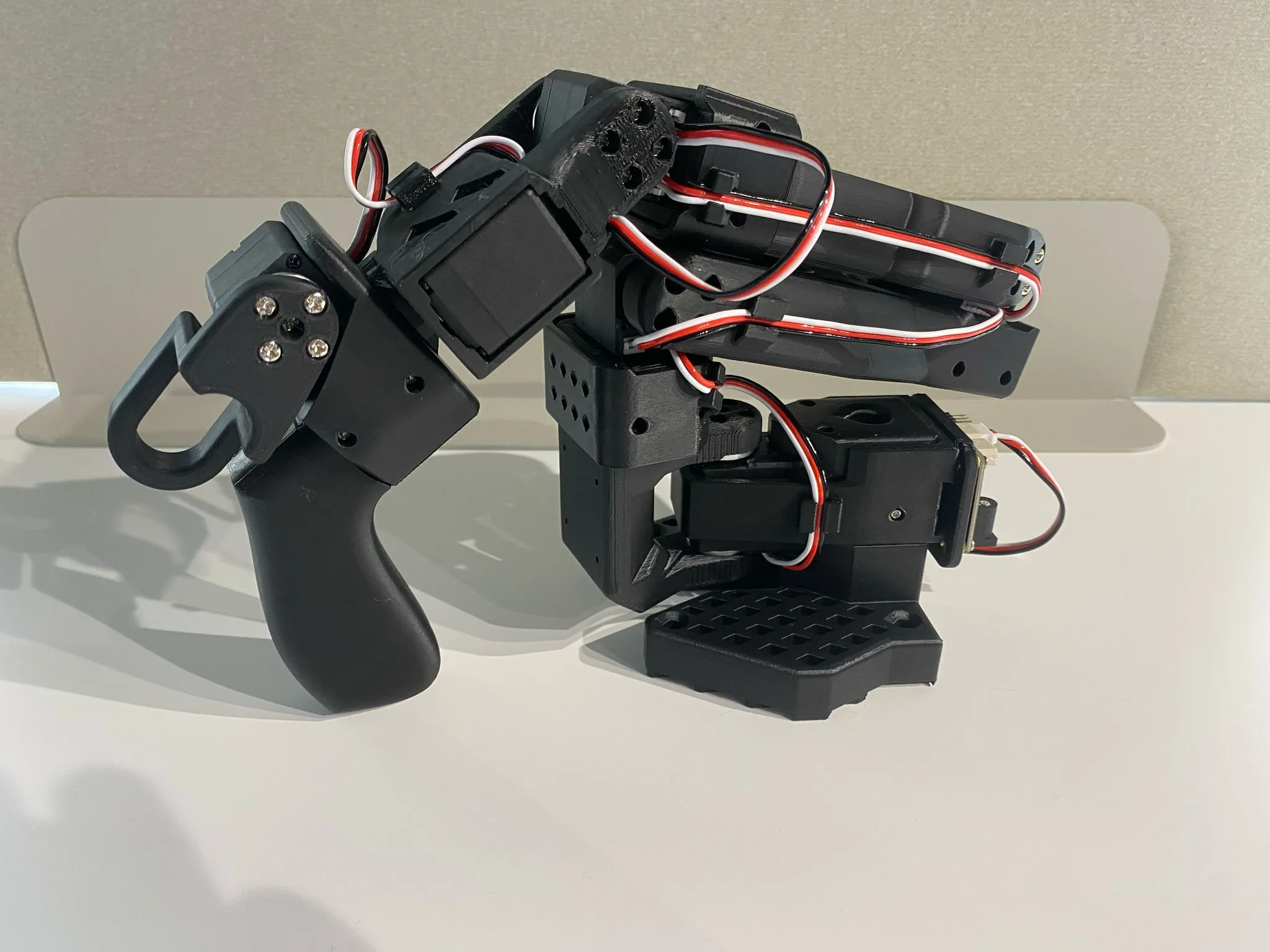
The arm is small and the motors are hobby-grade, so it will not lift much and it is not a lab robot. What makes it useful is the community and the data around it. On October 30, 2026 the Hugging Face Hub listed 83,214 datasets tagged LeRobot - Hugging Face, including 5,011 tagged so100 and 2,025 tagged so101. Researchers use that community data: Hugging Face trained its SmolVLA model on 487 community datasets recorded on the SO-100 - Hugging Face, and in May 2026 the MolmoAct2 team curated a training set "from 1,222 public LeRobot datasets contributed by 377 users", containing 38,059 demonstration episodes and about 184 hours of interaction data - MolmoAct2 paper. The same arm also appears in published research: a 2026 study of robot assistance in open surgery collected 160 teleoperated demonstrations on an SO-101 follower driven by a second SO-101 as the leader - arXiv.
Why this matters for a job seeker: the SO-101 is not a toy that teaches toy skills. It runs the same workflow, teleoperate, record, train, evaluate, that robot data teams run at scale, on the same software stack that serious research uses, and anything you record can be inspected by anyone with a link. How to apply it: treat the SO-101 as a miniature data collection station, not as a gadget. The rest of this guide is organized around that idea.
3. How leader-follower teleoperation works
The idea behind a leader-follower pair is simple enough to explain from first principles. Every joint on both arms is driven by a servo motor that knows its own angle. On the follower, the motors are powered and hold whatever angle the computer tells them to hold. On the leader, the motors are mostly used as sensors: you move the arm by hand, each motor reports its angle many times a second, and the computer sends those angles straight to the follower. Because the two arms have the same shape, the follower ends up in the same pose as the leader. Your hand motion becomes the robot's motion, with no joystick mapping or headset to learn.
The motors are Feetech STS3215 serial bus servos. Feetech's own evaluation describes the 7.4V version as having a stall torque of 19.5 kg.cm and a 360-degree magnetic encoder with 4096 positions, a resolution of 0.088 degrees - Feetech. The leader is the clever part of the design. LeRobot's documentation explains that it "uses three differently geared motors to make sure it can both sustain its own weight and it can be moved without requiring much force" - Hugging Face. The follower uses six motors with 1/345 gearing for strength, while the leader mixes 1/191, 1/345 and 1/147 gear ratios so that it feels light in your hand but does not flop when you let go.
The loop LeRobot runs when you teleoperate and record
Calibration is what makes the pair work, and it is also the first habit worth carrying into a job. LeRobot's documentation describes it as making sure "the leader and follower arms have the same position values when they are in the same physical position", and adds that it "allows a neural network trained on one robot to work on another" - Hugging Face. In practice you move each arm to the middle of its range, press Enter, then sweep every joint through its full range of motion. A badly calibrated pair produces a follower that lags or overshoots, and the data it records is subtly wrong, which is the home version of the quality problems that get episodes rejected in a lab.
This leader-follower principle is not a hobby shortcut; it is one of the main ways robot data is collected professionally. The ALOHA research system that introduced the ACT learning method collected its demonstrations with "a custom teleoperation interface" built from low-cost hardware, and showed robots learning tasks such as slotting a battery with 80 to 90 percent success from "only 10 minutes worth of demonstrations" - arXiv. The GELLO project generalized the idea: build a cheap controller "that has the same kinematic structure as the target arm, leveraging 3D-printed parts and economical off-the-shelf motors", and its user study found it more reliable for collecting demonstrations than VR controllers or 3D spacemouses - arXiv. That is the "GELLO style" tool RoboForce's posting names.
The same family of rigs shows up across the board. At Dexmate in Singapore, operators "Teleoperate robotic arms using Dexmate's exoskeleton system, where your movements directly control the robot" - Dexmate. Humanoid's AI Data Collectors in London use "tools such as the Universal Manipulator Interface (UMI)" - Humanoid, a handheld-gripper system for collecting demonstrations described in a 2024 research paper - arXiv. Why this matters: the motor skill a leader arm trains, moving smoothly and deliberately so that a machine copies you cleanly, is the same skill exoskeletons, GELLO devices and "the robot mirrors your actions" setups ask for. How to apply it: when you describe your practice later, describe it in these terms (kinematic leader-follower teleoperation) rather than "I built a robot kit".
4. What a kit costs, and who sells it
Prices for SO-101 kits vary more than the hardware does, because sellers differ in what they include: printed parts or not, a camera or not, assembled or not, one arm or two. The official repository lists the sellers it recognizes, among them Seeed Studio, WowRobo, PartaBot, RobotEd, Robonine, ForgeMotion Labs and others, noting which ones sell assembled versions - The Robot Studio. We read the product pages of the sellers most likely to ship to job seekers in the United States and Europe, plus Hiwonder and Waveshare, on October 30, 2026. All prices are list prices in US dollars unless stated, before shipping and import duties.
The table compares what each seller offers for a complete leader-follower pair. Where a page is unclear about what is in the box, the table says so rather than guessing.
| Seller | Option | Price | What the page says is included |
|---|---|---|---|
| Official parts list | Two arms, US parts | $229.88 | 12 servos, 2 motor control boards, cables, 2 power supplies, clamps, screwdrivers; you print the frame - The Robot Studio |
| Seeed Studio | SO-ARM101 Pro servo motor kit | $249.90 | "servo motors, an adapter board, and cables"; "does not include 3D-printed parts and camera" - Seeed Studio |
| Seeed Studio | SO-ARM101 Pro assembled kit | $299.00 | "fully assembled" with STS3215 servos and a BusLinker V3.0 board - Seeed Studio |
| WowRobo | Unassembled kit / assembled pair | $259 / $299 | 1 leader, 1 follower and 1 camera in both versions - WowRobo |
| PartaBot | Electronics only / full kit / assembled | $329 / $399 / $479 | 12 motors, 12V and 5V supplies, 2 boards, 4 clamps; all sold out - PartaBot |
| Hiwonder | DIY kit / assembled Starter Kit | $256.99 / $370.99 | Hiwonder HX-10HM and HX-30HM bus servos, six of each - Hiwonder |
| Waveshare | Kit without / with printed parts | $174.99 / $289.99 | Servo sets for both arms; resin-printed parts in the second - Waveshare |
The chart below puts the complete-pair prices side by side. PartaBot is left out because every SO-101 variant was sold out when we checked, and the Seeed servo kit is left out because its page does not say how many arms' worth of motors it contains.
A few details on those pages change the real cost. Seeed Studio sells a "Pro" version in which, according to its LeRobot wiki, "the Leader Arm should be calibrated and operated at every step using a 5V power supply, while the Follower Arm should be calibrated and operated at every step using a 12V power supply" - Seeed Studio wiki. The official repository explains why: the 12V follower motors have a stall torque of 30 kg.cm against 16.5 kg.cm for the 7.4V version at 6V - The Robot Studio. Seeed's assembled kit page describes a single "fully assembled" arm with "six high-torque STS3215 magnetic-encoder bus servos", while a reseller's listing of the same Seeed product number lists two assembled arms (one black, one white), a 32x32 mm USB camera and two adapter boards - Pakronics. Ask Seeed to confirm before ordering. Seeed's 3D-printed parts set costs $29.90 on its own - Seeed Studio.
WowRobo ships from China and says the shipping fee "does not include any import duties, taxes, or fees" for most countries, while a June 2025 note on the same page says that for US orders "All duties and taxes will be prepaid by WowRobo" - WowRobo. It also gives advice every buyer should take: "Servo motors are wear-prone components", and it recommends buying one or two spares, adding that "In most cases, the issues occur with the follower arm servos". Hiwonder describes its kit as built "on the original open-source design" but "deeply optimized" to eliminate underpowered servos and jerky movement, and it uses its own HX-series servos and a BusLinker board - Hiwonder. That may be a better arm, but it means you follow Hiwonder's tutorials rather than the official LeRobot motor setup, which is why it scored lower on matching the docs. Waveshare says it is "the officially Hugging Face Recommended Servo Driver Board Supplier" and that the driver board in the project is its product - Waveshare; the board itself, the Bus Servo Adapter (A), lists at $4.99 - Waveshare, and a single ST3215 servo at $16.99 to $21.99 depending on version - Waveshare.
The arms are not the whole bill. You need a computer that can run Python 3.12, since LeRobot's installation guide asks for "Python >=3.12" - Hugging Face, at least one USB camera if your kit does not include one (Seeed lists its X10 1080p USB camera at $12 as an add-on), a sturdy table to clamp the arms to, and optionally a GPU or a few dollars of cloud compute for training (section 9). Why this matters: two buyers can spend $230 or $480 on what is functionally the same setup, and the difference is mostly assembly labor, printed parts and import costs. How to apply it: price the complete pair, delivered to your door, with a camera, before comparing; then add the price of two spare follower servos.
5. Assembled, kit or build it yourself
The choice between an assembled pair, an unassembled kit and a full build from the parts list is really a choice about what you want to practice first. Assembly teaches you the hardware: how the motors are numbered, how the cables daisy-chain, why a joint binds. Buying assembled skips that and gets you to the skill the job postings care about most, controlling a robot cleanly, within a day. Neither is wrong, but they suit different people, and the difference in price between them is roughly $40 at WowRobo ($259 against $299).
The official repository lays out the two paths plainly: either "Source the components from the Bill of Materials" and "3D print the parts (or order the 3D printed parts)", or "Buy assembled arms or a parts kit from one of the vendors" - The Robot Studio. The full build demands the most. The repository recommends PLA+ filament, a 0.4 mm nozzle at 0.2 mm layer height and 15 percent infill, provides printer calibration gauges, and points people without a printer to printing services. Then come the screws: every joint in the official assembly guide calls for specific M2x6 and M3x6 screws in a specific order - Hugging Face.
| Route | Best for | What you learn first | Main risk |
|---|---|---|---|
| Assembled pair | People who want teleoperation hours fast | Calibration, teleoperation, recording | Less hardware understanding when something breaks |
| Unassembled kit | People who want to understand the hardware | Motor IDs, wiring, mechanical fit | A week or more before your first episode |
| Full build | People who own a 3D printer and like sourcing | Everything, including print tolerances | Many orders, many failure points |
| Follower only, with VR | People who already own a Meta Quest | VR teleoperation | Practices a different skill than leader-follower |
The fourth row deserves a word. The official repository notes that a follower-only kit "can be especially useful if you own a VR headset" - The Robot Studio, and Phospho's software lets you "Teleoperate with Meta Quest, gamepad, keyboard, and more" - Phospho. Because 15 of the 40 postings mention VR, this route maps more directly onto the most common requirement than a leader arm does. Phospho's starter pack with two SO-ARM100 arms and its Meta Quest app costs 995 euros - Phospho, which is why it scored lowest on cost; a follower arm from another seller plus a headset you already own is the cheaper version of the same idea.
How to decide, in practice: if you have never used a terminal, buy assembled, because your learning budget is better spent on software and teleoperation than on screws. If you enjoy building things and want to be able to repair the arm yourself, an unassembled kit teaches you more for less money, and the motor setup step (section 6) is the same command-line work several postings mention. Only build from the parts list if you already own a 3D printer and enjoy sourcing, because the money saved is small and the time cost is large. Why this matters: the goal is teleoperation hours and recorded datasets, and every route that delays those without teaching something an employer values is the wrong route for a job seeker.
6. Setting up: from box to first teleoperation
Setting up the software is where many people stall, and it is also the closest thing in this project to the "basic Linux commands" and "terminal basics" that seven of our 40 postings mention. LeRobot's documentation shows commands for macOS and Linux, and its installation guide adds a note for people "installing LeRobot inside WSL (Windows Subsystem for Linux)" - Hugging Face. The guide recommends the conda environment manager and Python 3.12. If you would rather avoid the terminal entirely, two graphical options exist: Hugging Face's own LeLab app, which "For now" is "compatible only with SO-ARM101" - Hugging Face, and Seeed's SenseCraft Robotics, which it describes as a "no-code platform" with a Windows and macOS client - Seeed Studio wiki.
For the command-line route, installation is a handful of commands. This is the sequence from the official guide, with the extras that add hardware support and training:
# Create and activate a Python 3.12 environment (conda via Miniforge)
conda create -y -n lerobot python=3.12
conda activate lerobot
conda install ffmpeg -c conda-forge

# Install LeRobot with the robot-workflow, training and Feetech motor extras
pip install 'lerobot [core_scripts,training,feetech]'
Each arm then needs its motors configured. Every arm connects to the computer through its own motor control board, and LeRobot first needs to know which USB port belongs to which arm, then needs to give each motor a unique ID, because brand-new motors "usually come with a default id of 1" - Hugging Face. The setup script walks you through it one motor at a time, starting with the gripper. If you bought an assembled pair, the seller has usually done this step: Seeed's wiki tells owners of pre-assembled arms to skip straight to calibration.
# Find which port each arm's board is on (unplug when prompted)
lerobot-find-port

# Give each motor its ID, one at a time, follower then leader
lerobot-setup-motors --robot.type=so101_follower --robot.port=/dev/tty.usbmodemXXXX
lerobot-setup-motors --teleop.type=so101_leader --teleop.port=/dev/tty.usbmodemYYYY

# Calibrate both arms: middle of range, Enter, then sweep every joint
lerobot-calibrate --robot.type=so101_follower --robot.port=/dev/tty.usbmodemXXXX --robot.id=my_follower
lerobot-calibrate --teleop.type=so101_leader --teleop.port=/dev/tty.usbmodemYYYY --teleop.id=my_leader
The port names above are placeholders; yours will look like /dev/tty.usbmodem... on a Mac or /dev/ttyACM0 on Linux. Two practical warnings from the documentation are worth repeating. If you use a Waveshare controller board, "make sure that the two jumpers are set on the B channel (USB)", and the USB cable does not power the motors, so both the power supply and USB have to be plugged in. Seeed's wiki adds a safety rule you should adopt from day one: clear "valuable items, fragile objects, tools, cables, and unrelated objects within 1 meter of the workspace", and power off "before plugging or unplugging servo cables" - Seeed Studio wiki. Its Pro kit also mixes voltages, and the official repository warns that the leader always uses 7.4V motors, so plugging the wrong supply into the wrong arm can damage motors.
Once both arms are calibrated, teleoperation is one command, using the same IDs you gave the arms during calibration:
lerobot-teleoperate \
  --robot.type=so101_follower --robot.port=/dev/tty.usbmodemXXXX --robot.id=my_follower \
  --teleop.type=so101_leader --teleop.port=/dev/tty.usbmodemYYYY --teleop.id=my_leader
Why this matters: the whole sequence, finding ports, setting IDs, calibrating, launching a session with the right parameters, is a small but real version of what Rhoda AI means by "running programs with arguments" and what Dyna Robotics means by familiarity with "the command line, bash, linux OS". How to apply it: keep a short setup log as you go, noting every error and how you fixed it. It costs nothing, it will save you when something breaks, and it becomes evidence later (section 11).
7. Practicing teleoperation like it is a shift
Once the follower moves when you move the leader, the temptation is to play. Playing is fine for an evening, but it builds the wrong habit for a job. Teleoperation work on our board is metrics-driven: you are given a task, a way to do it, and a target for clean episodes, and your output is reviewed. Rhoda AI's pilots must "Meet daily performance expectations for data collection throughput, quality, and consistency" - Rhoda AI. The useful way to practice at home is therefore to run short, structured sessions that look like a scaled-down shift, and to measure yourself the way a lab would.
Start with the task LeRobot's own tutorial recommends as a first dataset: "grasping an object at different locations and placing it in a bin" - Hugging Face. It sounds trivial, and that is the point. A lab's first training tasks are also simple, because the difficulty is not doing the task once, it is doing it the same way fifty times with a robot that is slightly less precise than your hand. The e-Yantra team, a robotics outreach program funded by India's Ministry of Education and hosted at IIT Bombay - e-Yantra, published a short walkthrough in August 2026 of exactly this stage: teleoperating an SO-101 pair and setting up cameras for recording datasets.
The LeRobot SO101 Arm: Leader Follower Teleoperation Setup, Episode 02
Because the follower copies the leader's joint angles, every tremor and hesitation in your hand reaches the robot, so the first skill to build is smooth, deliberate motion: approach, pause, grasp, lift, move, place, release, retreat. Sunday Robotics' in-house demonstrators, for comparison, work on tasks that "directly influence how our robot learns" - Sunday Robotics, and the same logic applies to your arm: whatever hesitation, overshoot or jitter you produce becomes part of what a model trained on your data will imitate. A practice plan that builds this skill in a few weeks looks like this:
| Week | Drill | What to measure |
|---|---|---|
| 1 | Pick a block from one spot, place it in a bin, 20 times per session | Success rate and seconds per attempt |
| 2 | Same task from five marked spots, 10 times each | Success rate per spot; which spot fails most |
| 3 | Stack two blocks, then insert a peg into a hole | Attempts until a clean run; grip failures |
| 4 | Timed sessions of 30 to 45 minutes with resets you do yourself | Clean episodes per session; fatigue |
The drills matter less than the measurement. Write down, for every session, how many attempts you made, how many were clean from start to finish without a regrip or a nudge, and how long each took. Labs talk in exactly these terms: Nimble Robotics' data collection supervisor reports "accepted episodes per operator-hour", which our data collection jobs guide discusses at length. If your clean-episode rate rises week over week, you have the single most persuasive piece of evidence a home setup can produce. If it does not, you have learned something valuable about whether this work suits you before you have spent a shift finding out.
Two other control methods are worth trying, because the postings mention them. LeRobot supports a gamepad, which its documentation recommends for its human-in-the-loop reinforcement learning workflow - Hugging Face, and a phone, using an iOS app or an Android browser page to stream the phone's position to the arm - Hugging Face. Neither feels like a leader arm. A gamepad maps sticks to motion the way the "dual-analog controllers" at FS Studio do, and phone control moves the gripper in space the way a VR controller does, so a session or two with each broadens what you can honestly say you have used. Several postings also describe two-person stations: Welo Data's stations are "staffed by two people" - Welo Data, and FS Studio rotates an operator and an observer who handles resets. If a friend can reset the scene for you, practice that rhythm too.
Why this matters: a lab will teach you its rig in a week or two, but it cannot quickly teach the patience to do the same motion cleanly for hours, and that is what the "repetitive, fine motor skill" line in so many postings is screening for. How to apply it: run your practice as timed sessions with a written log, increase difficulty only when your clean-episode rate is steady, and stop each session before your precision drops rather than after.
8. Recording demonstration datasets the way employers grade them
Teleoperation becomes data collection the moment you record it. In LeRobot that is one command, lerobot-record, which teleoperates exactly like before but also saves the follower's joint positions, the leader's commands and the camera video for every episode. The official tutorial's example records five episodes of a task described in plain words and uploads the result to your Hugging Face account - Hugging Face:
lerobot-record \
  --robot.type=so101_follower --robot.port=/dev/tty.usbmodemXXXX --robot.id=my_follower \
  --robot.cameras="{ front: {type: opencv, index_or_path: 0, width: 1920, height: 1080, fps: 30}}" \
  --teleop.type=so101_leader --teleop.port=/dev/tty.usbmodemYYYY --teleop.id=my_leader \
  --display_data=true \
  --dataset.repo_id=${HF_USER}/record-test \
  --dataset.num_episodes=5 \
  --dataset.single_task="Grab the black cube"
The recording loop is built around the same rhythm as a lab shift: record an episode, reset the scene, record the next. By default each episode lasts up to 60 seconds and each reset gets 60 seconds, and the keyboard controls let you end an episode early, cancel one and re-record it, or stop the session. The tutorial's advice on how much to record is concrete: "We suggest recording at least 50 episodes, with 10 episodes per location. Keep the cameras fixed and maintain consistent grasping behavior throughout the recordings." It adds a test worth memorizing: "A good rule of thumb is you should be able to do the task yourself by only looking at the camera images." That is the same standard a reviewer applies to footage in a lab: if the camera cannot see what happened, the episode is worth little.
Hugging Face has also published what it looks for when it curates community datasets, and the list reads like a lab's quality guideline. Its checklist asks for, among other things, steady video "(no shaking)", "neutral, stable lighting", that the "Leader arm should not appear in the frame", that "The only moving objects should be the follower arm and the manipulated items (avoid human limbs/bodies)", recording at about 30 frames per second, and task descriptions that are concise, "between 25-50 characters", rather than names like "task1" - Hugging Face. When the MolmoAct2 team built its training set from community SO-100 and SO-101 data, it ran every dataset through "structural validity checks", removed evaluation-style datasets, checked licences and applied "a final TOPReward quality gate" - MolmoAct2 paper. Community data, in other words, is reviewed and filtered just like paid data, and most of what gets filtered out is preventable at recording time.
| Lab practice | Where it appears in a posting | Home equivalent with LeRobot |
|---|---|---|
| Review your own takes | TELUS: "Review your own recordings, flag failed or incomplete attempts, and re-record" | Use the re-record key the moment an episode goes wrong |
| Log trial status and anomalies | Welo Data: "Record trial status, notes, and anomalies as directed" | Keep a session log beside the dataset |
| Follow the protocol exactly | TSMG: "Ability to follow detailed instructions" | Write a one-line protocol before every dataset |
| Keep cameras fixed | Multi-camera stations at most labs | Mark camera and object positions with tape |
| Consistent style | Accepted-episode targets everywhere | Same grasp, same speed, every episode |
The research that uses this arm makes the consistency point vividly. In the 2026 open-surgery study, a single person drove the leader arm for all 160 episodes, and the authors explain why: "a single teleoperator drove the leader arm throughout the entire dataset to keep motion style consistent" - arXiv. The figure below, from that paper, shows the setup as a pipeline: the human moves the leader, joint positions and two camera views are recorded, and the follower performs the task.

Panel B of that figure is the whole job in miniature: leader arm, recorded joint angles, two camera feeds, a fixed number of episodes. Why this matters: recording teaches the part of data collection that pure teleoperation does not, the discipline of producing episodes another person can use, and every rule in the checklists above has a direct counterpart in what operators are judged on. How to apply it: before each dataset, write the task description, mark the object and camera positions, decide how many episodes you will record, and afterwards open the dataset in Hugging Face's online viewer - Hugging Face and delete the episodes you would reject if you were the reviewer.
9. Training a policy, and correcting it by hand
The last step is the one that closes the loop: training a model, called a policy, on your episodes so that the follower can attempt the task on its own. Most operator jobs never ask you to do this, and you do not need to become a machine learning engineer. But watching a model learn from your data, and fail where your data was sloppy, teaches more about why consistency matters than any guideline can. It is also the most direct answer to the one posting that asks for "Familiarity with imitation learning or how demonstration data is used in robot policy training".
LeRobot's tutorial trains the ACT policy, the method from the ALOHA research described in section 3, with a single command. It notes that ACT "will automatically adapt to the number of motor states, motor actions and cameras of your robot", that you can train on an Nvidia GPU or on Apple silicon, and that "Training should take several hours" - Hugging Face:
lerobot-train \
  --dataset.repo_id=${HF_USER}/so101_test \
  --policy.type=act \
  --output_dir=outputs/train/act_so101_test \
  --job_name=act_so101_test \
  --policy.device=cuda \
  --policy.repo_id=${HF_USER}/my_policy
If your computer has no suitable GPU, the tutorial points to a Google Colab notebook and to Hugging Face Jobs, which runs the same command on rented hardware when you add a hardware flag. Hugging Face bills Jobs "by the minute", lists an Nvidia A10G small at $1.00 an hour and an Nvidia L40S at $1.80 an hour, and gives the example that "10 billable minutes on a10g-small costs approximately $0.17" - Hugging Face. For a sense of scale, the surgical study trained ACT for about 6 hours on a single L40S - arXiv, which at that list price would be roughly $11, and then ran its trained models on a MacBook Pro. A first home experiment with fewer episodes can cost less; the point is that training is affordable, not that it is free.
Then comes evaluation. LeRobot's lerobot-rollout command runs your trained policy on the arm, with modes for plain autonomous runs, continuous recording, and one called dagger for human-in-the-loop collection. The documentation describes it as deploying a trained policy "while a human operator monitors and intervenes when needed", recording "recovery movements and corrections" as new training data - Hugging Face. The SO-101 leader arm is on its list of compatible teleoperators, because its motors can move to mirror the follower when you take over. This is the home version of a second kind of job on our board: HireArt's robot operators spend shifts "demonstrating tasks, evaluating autonomous behavior, and documenting outcomes" - HireArt, and remote intervention is the core of robot fleet operations.
What you will see when you evaluate is instructive. The surgical study found that under ideal conditions its four policies reached "50-75% task success", and its data-scaling experiment showed that some methods "require substantially more data to reach competitive success rates" - arXiv. Your own first policy will probably succeed sometimes and fail in ways that trace back to your recording: a grasp you did two different ways, an object that drifted out of camera view, a reset you rushed. Why this matters: this is the part of the project that turns "I operated a robot" into "I understand why the lab cares how I operate it", which is the step from operator toward the quality and evaluation roles covered in our robot QA and evaluation guide. How to apply it: train one policy on your best 50 episodes, evaluate it on 10 attempts, write down every failure and its likely cause in your recording, then re-record and train again.
10. How home practice maps onto job requirements
It is easy to overstate what a home arm proves, and the honest version is more useful. A leader-follower pair practices some requirements directly, some partly, and some not at all. The diagram sorts the requirements we counted in section 1 by how well SO-101 practice covers them.
Requirements counted in 40 postings; dashed lines are what home practice does not build
The direct matches are real. Seven of the 40 postings describe rigs you drive with your own arm and hand movements, and a leader arm is the cheapest member of that family. Seven mention the command line, which you will have used for every step from motor setup to training. Repetitive precision, the quality behind "anything that proves repetitive, fine motor skill" at Adexis, is exactly what your session log documents. And the one posting that asks about imitation learning asks about the thing your training experiments teach. Collaborative Robotics' preference for experience through "personal builds" is the clearest case where a home project fits the posting's own words.
The partial matches need careful wording. A gamepad session lets you say you have controlled a real robot with a controller, which is relevant to the 14 postings that mention controllers or gaming, but it is not the same as hours in a lab's controller setup. "Robot experience" on a small hobby arm is genuine experience, but it is not experience with a humanoid, an industrial arm or an exoskeleton, and you should describe it as what it is. The gaps are just as clear. The 15 postings that mention VR want comfort in a headset over long sessions, which a leader arm does not build; if you own a Meta Quest, the VR routes in section 5 cover that gap better. And no home project changes the physical requirements: 1X requires operators to be "between 5'5" and 6'0" to safely operate required VR equipment" - 1X, and Figure's humanoid pilots must be able to "stand 8+ hours a day" - Figure.
| Requirement in postings | Postings (of 40) | What SO-101 practice gives you | What it does not |
|---|---|---|---|
| VR comfort | 15 | Nothing, unless you add a follower-only VR setup | Long sessions in a headset |
| Robotics or teleop experience | 15 | Real hours teleoperating and recording | Lab-grade or humanoid hardware |
| Controllers or gaming | 14 | Gamepad and phone teleoperation sessions | The specific lab controller |
| Command line, Linux or Python | 7 | Setup, recording and training from the terminal | Production tooling |
| Body-driven rigs | 7 | Leader-follower teleoperation, the GELLO principle | Exoskeletons and full-body suits |
Why this matters: an interviewer who runs a teleoperation floor will quickly see through an inflated claim, but will respect a precise one. How to apply it: describe your practice in the left two columns' terms, use the numbers from your log, and say plainly what you have not done, for example "no VR teleoperation yet". That honesty is itself a signal of the reliability every one of these postings is screening for.
11. Turning practice into evidence an employer can check
Practice only helps an application if someone can see it. The good news is that LeRobot makes your work public by default: datasets upload to your Hugging Face page, tagged LeRobot, and trained policies can be uploaded the same way. An employer, or an interviewer at a contractor such as TSMG or HireArt, can open a link and watch your episodes. That is better evidence than any sentence on a CV, because it shows the two things they care about, the quality of your demonstrations and the consistency across them.
The LeRobot Worldwide Hackathon in June 2025 asked teams to submit exactly two things: the datasets they recorded and "a demonstration video under 1 min long" - Hugging Face. That is a sensible format for a job seeker too. Put together a small evidence pack:
- A public dataset of at least 50 clean episodes of one task, with a clear task description
- A video under a minute showing a few teleoperated episodes and one attempt by your trained policy
- A one-page log with sessions, clean-episode rates over time, and the failures you fixed
- A short setup note listing the problems you hit (a wrong port, a bad calibration) and how you solved them
The pack works because it answers questions an operator lead actually asks. Can this person follow a protocol? The task description and the consistency of the episodes say so. Do they improve? The log shows it. Will they panic when the rig breaks? The setup note answers that. When you write the application, translate the pack into the employer's language rather than robotics jargon. A line in the shape of "Recorded [number] teleoperated pick-and-place episodes on an SO-101 leader-follower arm; raised my clean-episode rate from [start] to [end] percent over [weeks] weeks; dataset public on Hugging Face" says more than "hobbyist robotics experience", provided every number in it comes from your own log. Our interview practice page helps you rehearse saying it out loud.
Then apply where this evidence counts most. The postings that explicitly welcome beginners, like 120ft's teleoperator internship in Stockholm, which says "No previous robotics experience is needed" - 120ft, and FS Studio, which promises "we train you from scratch", are where a home project lifts an otherwise empty CV. Postings that ask for "Familiarity with VR interfaces, haptic devices, motion tracking, or robotic control systems", as Maven Robotics does - Maven Robotics, are where the precise wording from section 10 matters most. The live lists are at teleoperation roles, demonstration collection roles, our robot operator jobs page and entry-level robotics jobs; the board's count of teleoperation roles that can be done remotely stands at 1 today, so expect most of them to be on site.
Why this matters: the difference between "I bought a robot kit" and "here is my dataset" is the difference between interest and evidence. How to apply it: decide on your evidence pack before you start recording, so every session feeds it, and put the dataset link in the first lines of your application, next to your record of reliable, repetitive work.
12. Limits, costs and risks
The first limit is the one this guide has repeated: no posting requires a home kit, and none of the 40 we read mentions LeRobot or the SO-101. Labs hire for reliability, dexterity, availability and location first, and many of them train newcomers on their own rigs within a couple of weeks; our teleoperation guide describes those onboarding periods. A $300 arm will not get you past a height window, a commute you cannot make or a night shift you cannot work. If you live near a lab that hires without experience, applying today may be a better use of your time than practicing first, and you can practice while you wait for answers.
The second limit is the hardware itself. The SO-101 is a small, 3D-printed arm with hobby-grade servos, built for learning rather than heavy duty. WowRobo, which sells them, calls the servos "wear-prone components" and recommends spares - WowRobo, and the official repository notes that the follower's standard 7.4V motors have far less torque than the 12V option. Expect a motor to fail eventually, budget for it, and treat replacing it as part of the learning. The arm is also no humanoid: it teaches you the principles of teleoperation and data collection, not the specifics of driving a full-size robot through a VR headset.
The third set of risks is about money and safety. Before you spend anything, check what you could spend instead: a used VR headset might practice the most common requirement better, and free simulation, such as LeRobot's guide to training in simulation - Hugging Face, lets you learn the software side at no hardware cost. When the arm is running, follow the safety rules Seeed publishes: keep at least a meter clear around the arm, keep people out of its range, and power off before touching cables - Seeed Studio wiki. And be wary of anyone who claims a kit, a course or a "teleoperation certificate" you pay for will get you hired. Real employers pay you for training: Nidus describes "paid training and certification on our equipment". If someone asks you to pay to qualify for a robot job, run the offer through our job scam checker first.
| Risk | What it looks like | How to limit it |
|---|---|---|
| Overpaying | Assembled kits at $480 when $299 buys the same pair | Compare delivered prices with a camera included |
| Import costs | Duties on shipments from China | Check the seller's duty terms for your country |
| Servo failure | A follower joint stops responding | Buy one or two spare follower servos up front |
| Overclaiming | "Robotics experience" with no detail | Use your logged numbers and say what you have not done |
| Pay-to-qualify offers | Fees for kits, courses or certificates "required" for a job | Real employers train you; check offers before paying |
Why this matters: the cheapest mistake is to buy a kit and never use it, and the most expensive is to believe it guarantees a job. How to apply it: set a goal before buying (for example, a public 50-episode dataset and a trained policy within six weeks), and if you are not on track after two weeks, sell the arm while it still has value.
13. Who should buy one, and who should not
Reasoning from the postings back to the purchase gives a clear answer. A home SO-101 setup is worth its cost when three things are true: you want teleoperation or data collection work, you do not yet have evidence of robot or repetitive precision work, and you will actually put in the hours. It is a poor purchase when you already qualify for the roles near you, when the roles you want are dominated by VR requirements you could meet more cheaply with a headset, or when the money would strain your budget.
It helps to set the cost against what the work pays. Today the teleoperation roles on our board that state an hourly rate typically pay $25 to $40 an hour, with a median of $30, and demonstration collection roles pay $20 to $50, with a median of $30. The chart shows those live figures side by side.
The arithmetic is simple. Among the postings quoted in this guide, Collaborative Robotics offers $20 an hour, Physical Intelligence $25, Nidus $30 and Welo Data $35, so a $299 assembled pair costs between roughly 9 and 15 hours of that pay. If a public dataset and a trained policy make the difference in even one application, the kit pays for itself in the first two working days. If they make no difference, you have spent a few hundred dollars to learn whether you enjoy the work, which is still cheaper than finding out on a contract.
| Your situation | Recommendation |
|---|---|
| No robot or repetitive-precision record, roles near you | Apply now, and buy an assembled pair to build evidence while you wait |
| Strong steady-hands record (trades, crafts, gaming) | Apply first; a kit is optional |
| Target roles mostly mention VR | Practice in a headset; consider a follower-only VR setup |
| Aiming for QA or data operations | Buy a kit and go all the way to training and evaluating policies |
| Tight budget | Start with free simulation and the LeRobot docs; buy later |
For most readers the best value is an assembled pair from the official kit list, Seeed Studio or WowRobo at $299, unless you own a 3D printer and want to learn the hardware, in which case an unassembled kit or the parts list makes sense. Why this matters: the right purchase is the one that gets you to a public dataset fastest. How to apply it: decide which row of the table describes you, check today's openings on our pay explorer and the live lists, and only then choose a seller.
14. How we researched this guide
The job requirements in this guide come from postings on the RobotTraining.jobs board, which re-reads each tracked employer's own job board every day. On October 30, 2026 we searched the board for open teleoperation and demonstration collection roles, opened 155 of the postings it returned, kept one posting per employer and job title for roles that involve operating a robot or recording demonstrations for one, and counted how many of the remaining 40 mention each item in the chart in section 1. A posting counts when its text mentions the item as a requirement, a preference or a bonus, and we read every match by hand. Quotes are copied from the postings as published that day. Open-role counts and pay bands written as links in the text and in the last chart are read from the live board each time the page loads, and each opens the list it counts; our methodology page explains how the board treats missing and unusual pay.
Kit prices, contents and stock come from each seller's own product page, read on October 30, 2026, in the currency the page displayed. Where a page was ambiguous about what is in the box, we say so in the text rather than filling the gap. Technical details about LeRobot and the SO-101 come from Hugging Face's documentation and The Robot Studio's repository, and research results come from the papers themselves, each linked where it is used. Prices change often, and import duties depend on where you live, so check the seller's page before buying.
There are two disclosures. RobotTraining.jobs earns nothing from any seller named in this guide: every seller link is a plain link, none of them carries an affiliate or referral code, and if that ever changes we will mark such links clearly. And this guide is produced on Founden, the platform RobotTraining.jobs is built and operated on, with an AI agent doing much of the research and drafting; that is one reason every figure in it links to a source you can check yourself.
15. Frequently asked questions
Can I get robot teleoperation experience at home?
Yes, within limits. An SO-101 leader-follower arm pair running Hugging Face's free LeRobot software lets you teleoperate a real robot arm by hand, record demonstration datasets and train a policy on them. It builds genuine teleoperation and data collection experience on a small arm, but it does not replace a lab's VR or humanoid rig, and no job posting we read requires it.
How much does an SO-101 leader-follower kit cost?
On October 30, 2026 the official parts list priced the two arms at $229.88 in US parts before 3D printing. Assembled pairs cost $299 at Seeed Studio and WowRobo, WowRobo's unassembled kit with a camera cost $259, Waveshare's kit with printed parts cost $289.99, and Hiwonder's assembled Starter Kit cost $370.99. Shipping and import duties come on top.
Do teleoperation jobs require my own robot or a LeRobot kit?
No. None of the 40 operator postings we read names LeRobot or the SO-101, and none asks applicants to own robot hardware. Twelve say no experience is needed or that training is provided. A home project helps as evidence of interest and skill, especially for postings that mention personal builds, body-driven teleoperation rigs or the command line.
Should I buy the SO-101 assembled or build it myself?
Buy assembled if your goal is teleoperation hours quickly or you have never used a terminal; the price difference at WowRobo was $40. Choose an unassembled kit if you want to understand and repair the hardware. Build from the parts list only if you already own a 3D printer, because the savings are small and the time cost is large.
What is the difference between the SO-100 and the SO-101?
The SO-101 is the newer version. The Robot Studio's repository says it has improved wiring, is easier to assemble with no gear removal, and uses updated motors for the leader arm, which mixes three gear ratios so it holds its own weight but moves easily by hand. The SO-100 documentation is now marked as deprecated.
Do I need a powerful computer or a GPU?
Not for teleoperating and recording, which need a computer that runs Python 3.12 and has USB ports for the arms and a camera. Training a policy is faster on an Nvidia GPU or Apple silicon, and LeRobot's tutorial says training takes several hours. Without a suitable GPU you can use a Google Colab notebook or Hugging Face Jobs, which lists an Nvidia A10G at $1.00 an hour, billed by the minute.
Does the SO-101 help with VR teleoperation jobs?
Only partly. A leader arm does not practice VR, which 15 of the 40 postings mention. If VR is your target, practice in a headset, or consider a follower-only setup driven by a VR app; Phospho's software, for example, supports Meta Quest teleoperation of SO-100 arms.
How many demonstrations should I record?
LeRobot's tutorial suggests at least 50 episodes for a first pick-and-place dataset, with 10 episodes per object location, fixed cameras and a consistent grasp throughout. Its LeLab app recommends 30 or more episodes. For job evidence, 50 clean, consistent episodes of one task are worth more than many rushed ones.
Can I teleoperate the SO-101 with a game controller?
Yes. LeRobot supports a gamepad, which its documentation recommends for its human-in-the-loop reinforcement learning workflow, and it also supports teleoperation from a phone. These are useful because 14 of the 40 postings mention controllers or gaming, though they feel different from the leader arm.
This guide reflects job postings, seller prices and documentation as of October 30, 2026. Open-role counts and pay figures written as links are read from the live board. Kit prices, contents and stock change often, so check the seller's page before you buy and the live posting before you apply.